How to delete photos from phone but not Google Photos on Android
Here is how to delete photos from your phone but not Google Photos: open the Google Photos app, tap your profile picture, then Free up space on this device. Google describes it as the way to delete photos from the phone once they are safely backed up; they stay in your Google Photos library (Google Photos Help).
For a single photo, open it in Google Photos, tap More, then Delete from device (Google Photos Help). The trap is the normal Trash button: in Google Photos it deletes the photo from your phone and from your library. The steps below are for the Google Photos app on Android; menu names come from Google’s help pages and can shift slightly between app versions.
Before you delete photos from your phone: check they are backed up
Both methods only make sense for photos that are already in the cloud. Google’s own page warns to back up your photos before you delete anything from your device (Google Photos Help).
To check one photo, open it in Google Photos, tap More, then About, and look under Details. A backed-up photo shows Backed up with a cloud-and-check icon (Google Photos Help). To check everything, tap your profile picture: the status reads Backup complete or Backup is off. In the photo grid, with backup on, a cloud with a line through it means that photo is not backed up and is not waiting to upload.
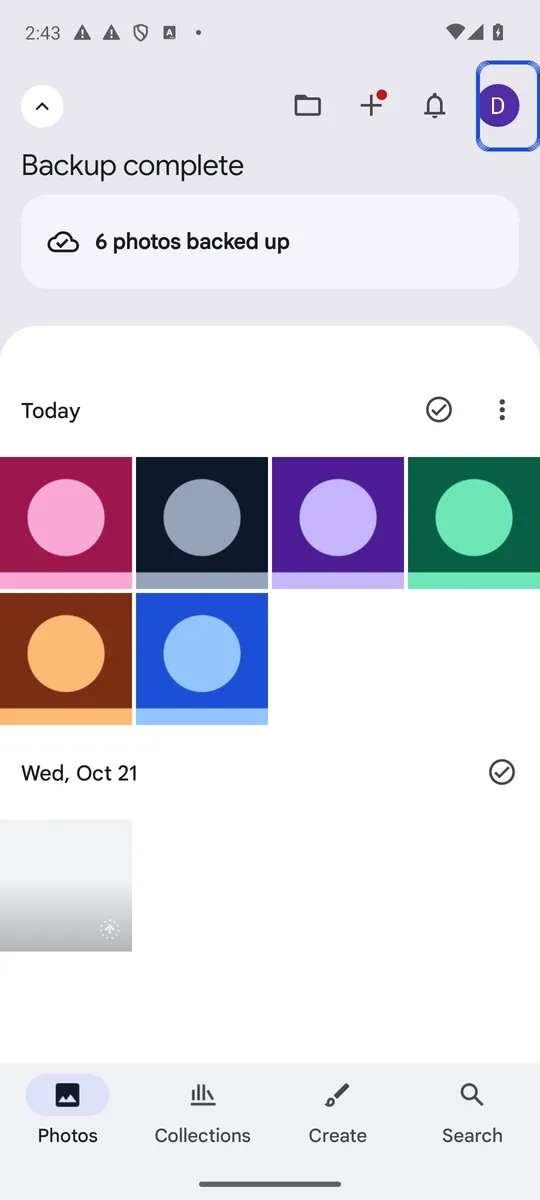
Screenshot: Google Photos 7.98 on an Android 14 emulator, captured 26 October 2026, on a test account whose library holds only generated sample images.
Also check your backup quality. With Storage saver, photos over 16 MP are resized to 16 MP and videos over 1080p to 1080p; with Original quality, files keep their full resolution (Google Photos Help). If you delete the phone copy of a Storage saver photo, the smaller cloud copy is the only one left.
How to delete photos from your phone but not Google Photos, all at once
- Open the Google Photos app and make sure you are signed in to the account your photos back up to.
- Tap your profile picture or initial.
- Tap Free up space on this device. The app shows how much space you will get back.
- Tap Free up [x] from device to confirm.
Google frames this as deleting photos that are safely backed up, and its warning is blunt: the feature deletes photos from your device, so check backup first, as above. Google also notes that items less than 30 days old may stay on your device, though they still back up (Google Photos Help). You can still view, edit, share and delete them in the Google Photos app and at photos.google.com.
How to delete one photo from your phone but not Google Photos
- Open the photo in Google Photos.
- Tap More at the top.
- Tap Delete from device (Google Photos Help).
The photo stays in your Google Photos library; only the copy on the phone is removed.
Why deleting in Google Photos also deletes from your phone
The Trash button in Google Photos removes the photo from your device too, and if backup is on, Google deletes the same items from every device that backs up to that account (Google Photos Help). Trashed items stay in the Google Photos trash for 30 days, so you can restore them in that window; our guide to where deleted photos stay on Android shows how.
Deleting with another app, such as Samsung Gallery or a file manager, is not covered by Google’s help pages, so behavior can differ by phone. So if you use Samsung Gallery and want to know how to delete photos from your phone but not Google Photos, the safe way is still to use the two options above inside the Google Photos app: they are the ones Google documents as keeping the cloud copy.
Where your photos show up after you delete them from the phone
After Free up space, Google says you will not see those photos in your phone’s built-in gallery app, when you are offline, or when you are not signed in to Google Photos (Google Photos Help). If you want some photos available offline, keep them on the phone.
They also keep using your Google storage. Every Google Account gets up to 15 GB free, shared between Gmail, Drive and Photos, and if you go over it, new photos stop backing up (Google One Help). Deleting the phone copy frees space on the phone, not in your Google Account.
The opposite: delete from Google Photos but keep on the phone
If you want the reverse, turn off backup on the phone first, then delete the photos at photos.google.com. With backup still on, the phone copy may be deleted too, or the photo may be uploaded again (Google Photos Help). Our guide on how to stop Google Photos from backing up has the full steps, including Undo backup, which removes everything one phone uploaded.
Deleting private photos from your phone? The cloud copy is still yours to protect
Removing a photo from the phone does not make it private. It stays in your Google Account, where anyone signed in to that account can see it, and shared albums or partner sharing can show it to others. See how to make Google Photos private for sharing and partner settings, and whether Google Photos Locked Folder is safe if you want sensitive photos out of the main grid.
If you would rather keep a private photo on the phone and out of the cloud altogether, our guide on how to hide photos on Android compares the options. Lockspeare is one of them: an encrypted vault that keeps photos on your phone behind their own PIN or pattern. It cannot remove copies that are already in Google Photos, so delete those there.
Common questions
Can I delete photos off my phone but keep them on Google Photos?
Yes, as long as they are backed up. In the Google Photos app, tap your profile picture, then Free up space on this device. Google describes it as the way to delete safely backed-up photos from the phone; they stay in your Google Photos library. Check that backup is complete first.
Why do photos delete from Google Photos when I delete them from my phone?
Because deleting with the normal Trash button in Google Photos removes the photo from the phone and from your library, and with backup on, from every device backing up to that account. Use Delete from device or Free up space instead; they only remove the copy on the phone.
Does deleting from Samsung Gallery delete from Google Photos?
Google's help pages do not describe what happens when you delete a photo with another gallery app such as Samsung Gallery. To be sure the cloud copy stays, delete the phone copy from inside the Google Photos app with Delete from device or Free up space, which Google documents as removing only the device copy.
Will my photos lose quality if I delete them from my phone?
They can. If your backup quality is Storage saver, Google keeps photos over 16 MP at 16 MP and videos over 1080p at 1080p. Once the phone copy is gone, the smaller cloud copy is the only one left. With Original quality, the files keep their full resolution.