How to remove location from photos on Android
To remove location from photos on Android, delete it from the photo’s details (Samsung Gallery can do this), share the photo with its location removed, and turn off the location setting in your camera app so new photos don’t save it. Google Photos cannot remove a location your camera saved, only ones it estimated or you added.
Most phone cameras can write the place a photo was taken into the file itself, as GPS coordinates in the photo’s EXIF metadata. Anyone who gets the original file can read them. Here is how to remove location from photos you already have, how to send photos without it, and how to stop new ones carrying it.
How to check if a photo has a location
Open the photo in Samsung Gallery or the Google Photos app and swipe up to see its details, including any location (Android Central). Samsung describes the same swipe-up view as the way someone you send a photo to can see where it was taken (Samsung). In Google Photos on a computer, the location sits under Info (Google Photos Help).
To check a photo file on a computer or any phone, our free photo location checker reads it in your browser.
A photo can get its location in three ways, according to Google: your camera saved it, you added it yourself, or Google Photos estimated it from landmarks and your other photos (Google Photos Help). Which of these you have decides how you can remove it.
How to remove location from photos on a Samsung phone
On a Galaxy phone, here is how to remove location from photos already in the gallery: Samsung’s Gallery app deletes it from the photo itself. SlashGear describes these steps (SlashGear):
- Open the photo in Gallery.
- Tap the three-dot menu at the top right and choose Details.
- Tap Edit, then the red minus icon next to the location.
- Tap Save.
This changes one photo at a time. For hiding photos rather than cleaning them, see how to hide photos on Samsung.
How to remove location from photos in Google Photos
Google Photos can only remove locations it estimated or that you added by hand. A location your camera saved cannot be edited or removed in Google Photos, per Google’s help page (Google Photos Help). On photos.google.com, open the photo, click Info, then More next to the location, then Edit, and pick Remove location; to clear several photos, select them, click More, then Edit location. If your selection includes photos with a camera location, Google Photos asks you to deselect them first.
To stop Google Photos estimating new locations, turn off Estimate missing locations in Photos settings under Privacy, then Location options. Google notes that turning it off does not delete estimates it already made (Google Photos Help).
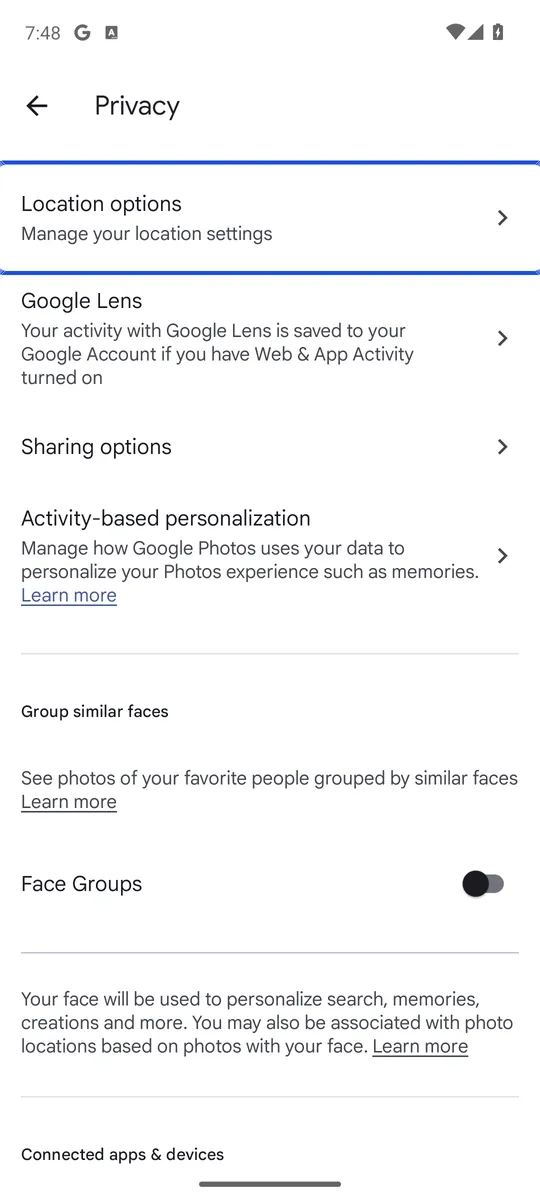
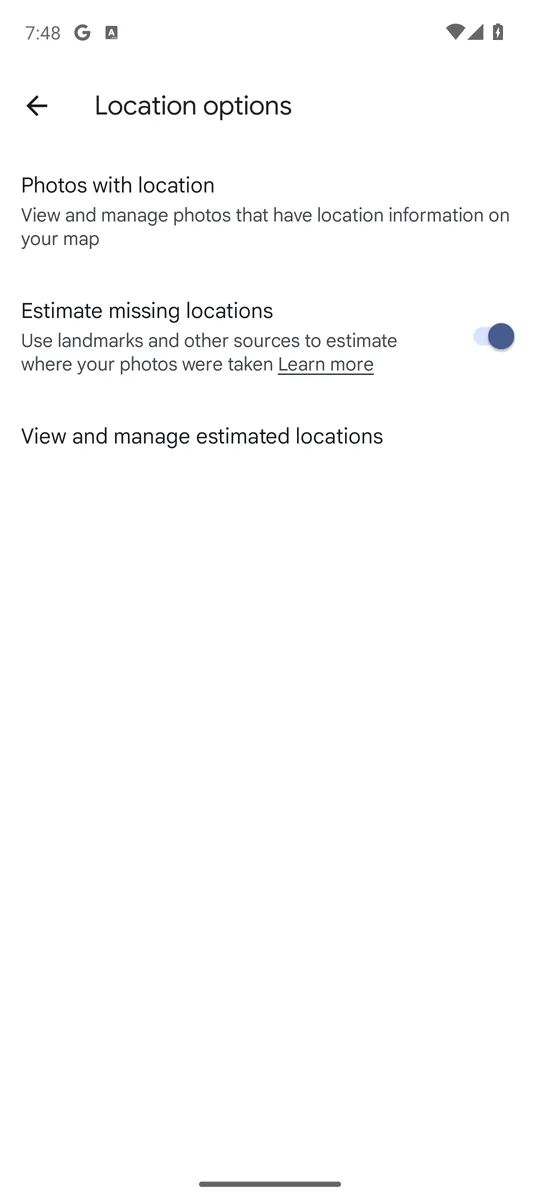
Screenshots: Google Photos 7.95 on an Android 14 emulator signed in to an empty test account, captured 8 October 2026. Google changes the settings layout between app versions.
For a camera location on a phone without Samsung’s editor, an EXIF editor app is the remaining option. SlashGear walks through one such app from Google Play that can remove the location (and also the capture time or camera model) from several photos at once (SlashGear). Such an app needs access to your photos, so pick one you trust.
How to remove location from photos when you share them
Often you only need the location gone from the copy you send. Here is how to remove location from photos as you share them:
- Samsung Gallery share option: on One UI 3.0 or later, select the photos, tap Share and tick Remove Location data before choosing the app. The recipient then cannot see where the photos were taken (Samsung).
- Samsung Messages with Auto Blocker: when Auto Blocker’s Maximum restrictions is on, Samsung Messages turns on Remove location from shared images. Samsung lists the Galaxy Z Fold6 and Z Flip6, S24 and S23 series and Galaxy A models with Auto Blocker (Samsung).
- The Android photo picker: when an app asks you to choose photos through the system picker, Android removes the location from those photos by default (Android Authority). Since the August 2026 Mainline update, an app can ask for it (Android Authority); you then choose Include location or Don’t include, and Android remembers the choice for that app (Sammy Fans). Our guide to the Android photo picker explains what else it limits.
- Google Photos links, albums and conversations: Google says locations are private by default, and new links, albums and conversations leave them out unless you turn Share photo locations on. Partner sharing is the exception: it includes locations (Google Photos Help). Our guide on how to make Google Photos private covers those settings.
- Any photo, on any device: our free photo metadata remover takes the location out of a JPEG, PNG or WebP file in your browser, without uploading it. Choose Remove location only to keep the date, or remove all metadata.
One catch: a photo you download from Google Photos and send elsewhere keeps the original location your camera saved, without any edits you made in Google Photos (Google Photos Help).
Apps that can read your whole photo library also see less than you might think: on Android 10 and later the system hides photo locations by default, and an app has to ask your consent for a separate permission to read them (Android Developers).
How to stop your camera saving location on new photos
The simplest way to remove location from photos is to never save it. Open your camera app’s settings and turn off the location option. Google’s help page lists the name each maker uses (Google Photos Help):
| Phone | Camera setting to turn off |
|---|---|
| Google Pixel | Save location |
| Samsung | Location tags |
| Xiaomi | Save location info |
| OnePlus | Store location data |
| Motorola, Sony | Save location |
| OPPO | Location |
| Vivo | Geographic locations |
On a Samsung phone, open Camera, tap the Settings gear and find Location tags; Samsung’s own page shows the same switch for turning it on (Samsung). If your camera has no such option, SlashGear suggests denying the camera app the location permission in Settings > Apps > Camera > Permissions > Location (SlashGear). Menu names vary by phone. Photos you already took keep their location until you remove it.
The trade-off: Google notes that photos without a location may not show on the map, in location searches or in trip memories (Google Photos Help).
What removing location from photos does not hide
Removing the coordinates does not make a photo anonymous. Google warns that people may still work out the place from landmarks in the picture (Google Photos Help). And it does nothing about who can open the photos on your phone.
If the photos themselves are private, keep them out of the gallery: our guide on how to hide photos on Android compares the built-in options. Lockspeare, our vault app, stores photos encrypted on the phone instead of in the gallery. If you delete the originals after moving them, deleted photos stay in the trash for a while.
Common questions
How do I remove GPS location from a photo on Android?
On a Samsung phone, open the photo in Gallery, tap the three-dot menu, then Details, tap Edit and remove the location. On other phones, Google Photos cannot remove a location the camera saved, so you need an EXIF editor app, or you can share the photo without location (Samsung's share option, or the Android photo picker, which removes it by default).
How can I remove metadata from a photo?
Samsung Gallery's Details editor removes the location from a photo. EXIF editor apps from Google Play can also remove other details, such as the capture time or the camera model, and some work on many photos at once. Our free photo metadata remover does it in the browser for JPEG, PNG and WebP files, without uploading them.
Does Google Photos share my photo locations?
Not by default for new links, albums and conversations; Google says locations are private by default and estimated locations are never shared. Partner sharing is the exception, and a photo you download and send outside Google Photos keeps the location your camera saved.
Can someone still tell where a photo was taken without location data?
Yes. Google points out that people may recognize the place from landmarks in the picture. Removing location data only removes the coordinates stored with the file.